
Core Features of Spring AI
Spring AI provides a comprehensive framework for integrating Artificial Intelligence capabilities into Java and Spring Boot applications.
Its core features can be grouped into the following areas.
1. Model API – Chat and AI Model Integration
Spring AI provides a unified API to interact with different AI model providers.
Supported model integrations include:
- Ollama
- OpenAI
- Azure OpenAI
- Anthropic
- Google Gemini
- Amazon Bedrock
- Mistral AI
Key abstractions:
ChatModelChatClientEmbeddingModelImageModelAudioModel
Example:
String response = chatClient
        .prompt()
        .user("Explain microservices")
        .call()
        .content();
Benefit: Switch AI model providers with minimal application code changes.
2. Prompt Engineering
Spring AI supports structured prompt construction.
Features:
- System prompts
- User prompts
- Prompt templates
- Dynamic variables
- Parameterized prompts
- Chat message roles
Example:
PromptTemplate template = new PromptTemplate(
    "Explain {technology} in simple terms"
);

Prompt prompt = template.create(
    Map.of("technology", "Spring Boot")
);
This allows dynamic prompt generation from application data.
3. Structured Output
Spring AI can convert AI responses into Java objects.
Features:
- JSON output
- Java DTO mapping
- Structured response extraction
- Type-safe AI response handling
Example:
public record Employee(
    String name,
    String department,
    int experience
) {}
Employee employee = chatClient.prompt()
.user("Generate an employee profile")
.call()
.entity(Employee.class);Benefit: Integrate AI-generated data directly into Java business logic.
4. AI Tool Calling / Function Calling
This is one of the most important features for building AI Agents.
Spring AI allows an LLM to invoke Java methods exposed as tools.
Example:
@Component
public class AccountTools {

    @Tool(description = "Get customer account balance")
    public String getBalance(String accountId) {
        return "Account balance is ₹50,000";
    }
}
Expose the tool to AI:
String response = chatClient.prompt()
    .user("What is the balance of account 123?")
    .tools(accountTools)
    .call()
    .content();
The AI can decide when to call getBalance() based on the user’s question. Spring AI handles the tool execution loop with ChatClient. docs.spring.io
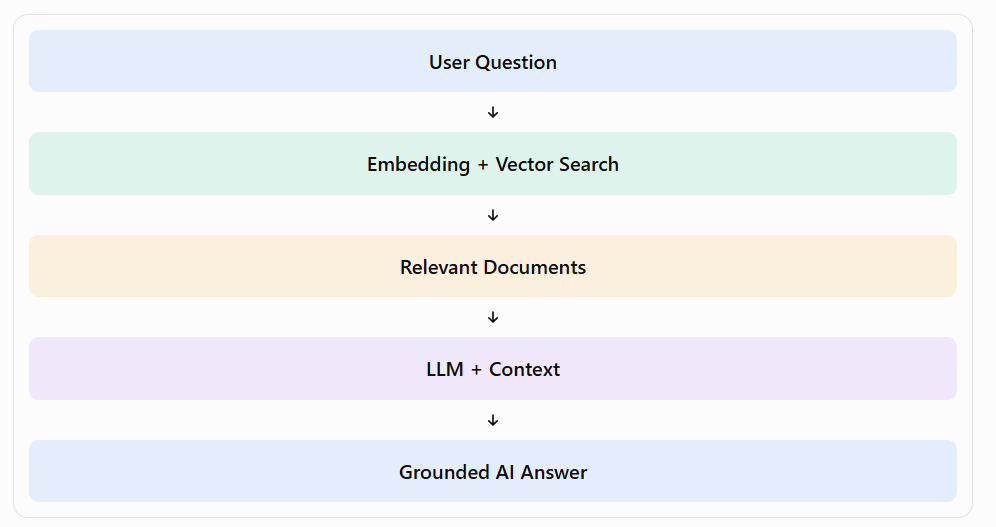
5. Retrieval-Augmented Generation (RAG)
RAG allows AI to answer questions using your organization’s documents and database information.
Features:
- Document ingestion
- Document splitting/chunking
- Embedding generation
- Vector database storage
- Similarity search
- Context injection into prompts
- Retrieval-based question answering
Example architecture:
6. Vector Database Integration
Spring AI provides a portable VectorStore API.
Supported databases include:
- PostgreSQL / PGVector
- Redis
- Pinecone
- Qdrant
- Elasticsearch
- Milvus
- MongoDB Atlas
- Chroma
- Weaviate
- Oracle
You can change vector database implementations with minimal application-level changes. Ref
7. Chat Memory / Conversation History
LLMs are generally stateless between requests.
Spring AI supports conversation memory to maintain context across multiple interactions.
Features:
- Conversation IDs
- Message history
- Memory repositories
- Database-backed conversation memory
- Integration with Advisors
Example:
chatClient.prompt()
    .advisors(a -> a.param(
        ChatMemory.CONVERSATION_ID,
        "user-101"
    ))
    .user("What did I ask earlier?")
    .call()
    .content();
8. Advisors API
Advisors provide reusable logic around AI interactions.
They can:
- Modify prompts before sending them to the LLM.
- Add conversation history.
- Retrieve documents for RAG.
- Process AI responses.
- Add reusable AI behavior.
Examples:
MessageChatMemoryAdvisorQuestionAnswerAdvisorRetrievalAugmentationAdvisorRef
9. MCP – Model Context Protocol
Spring AI supports MCP integration.
You can:
- Connect your AI application to external MCP servers.
- Access tools provided by MCP servers.
- Expose Spring application functionality through MCP.
- Integrate AI applications with external systems.
10. Multimodal AI
Spring AI supports more than text-based AI.
| Capability | Description |
|---|---|
| Chat | Text conversations |
| Image generation | Generate images |
| Audio transcription | Audio to text |
| Text-to-speech | Text to audio |
| Embeddings | Text/vector representation |
| Moderation | Content moderation |
11. Observability and Evaluation
Spring AI provides:
- Metrics
- Distributed tracing
- AI request/response monitoring
- Model evaluation utilities
- Logging support
- Token/operation visibility
This helps monitor AI interactions in production Spring Boot applications. docs.spring.io
12. Spring Boot Auto-Configuration
Spring AI integrates with Spring Boot through:
- Starter dependencies
- Auto-configuration
- Configuration properties
- Dependency injection
- Model-specific configuration
This reduces manual integration work.
Complete Spring AI Feature Summary
| Feature | Spring AI Component |
|---|---|
| Chat with AI | ChatClient |
| AI Model integration | ChatModel |
| Prompt engineering | PromptTemplate |
| Structured responses | Entity mapping |
| AI Agent tools | @Tool |
| RAG | Advisors + VectorStore |
| Embeddings | EmbeddingModel |
| Vector database | VectorStore |
| Conversation history | ChatMemory |
| Reusable AI logic | Advisors |
| External AI tools | MCP |
| AI monitoring | Observability |
| Image/audio AI | Model APIs |
Official documentation: Spring AI Reference Guide.
Recommended learning sequence: ChatClient → Prompt Templates → Tool Calling → Chat Memory → Embeddings → PGVector → RAG → MCP → AI Agent Architecture.